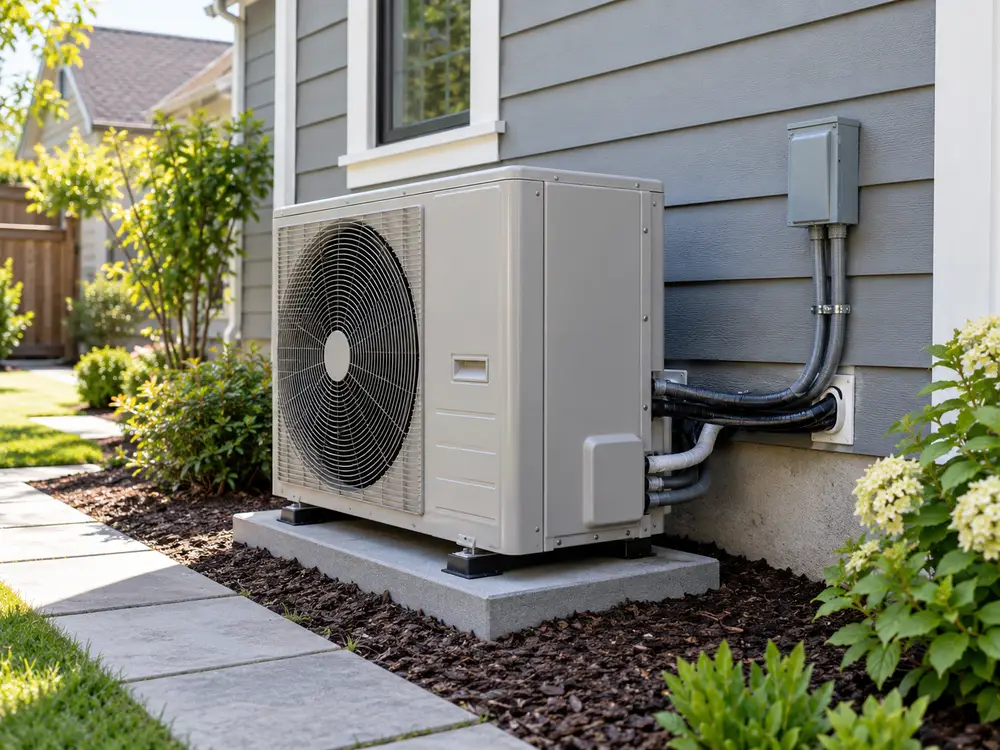
Quick answer: A typical conventional 24V heat pump thermostat uses R for control power, C for common, Y/Y1 for the compressor, G for the indoor fan, and O/B for the reversing valve. Some systems add AUX for backup heat, E for emergency heat, or Y2 for a second compressor stage. Match terminal functions—not wire colors—to the exact equipment manuals.
If you are replacing a thermostat, first identify the heat pump and backup heater, shut off the applicable power, photograph the old terminals, and label each connected wire. Select the correct system diagram below. If voltage, B/C identity, Rc/Rh transformers or a proprietary controller is unclear, use a qualified technician rather than guessing.
Which heat pump thermostat wiring diagram fits your system?
First identify the control system. The basic R/C/Y/G/O/B example below fits a conventional heat pump that accepts separate 24V thermostat calls. For electric backup heat, select the auxiliary-heat example. For gas furnaces, communicating controls or line-voltage connections, follow the matching equipment-specific controller and wiring section.
| Existing system | What you are likely to see | Use this article section / stop condition |
|---|---|---|
| Single-stage conventional heat pump | R, C, Y/Y1, G, O/B | Use the single-stage reference below; verify exact terminals. |
| Heat pump with electric auxiliary heat | Basic group plus AUX/W2 or another approved input | Use the electric-AUX reference below only after confirming backup type. |
| Two-stage conventional heat pump | Basic group plus Y2 | Read Y1/Y2 stage-control section and exact equipment instructions. |
| Heat pump with gas-furnace backup | Heat-pump calls plus a furnace/dual-fuel control | Read the dual-fuel control section; do not use electric-AUX mapping. |
| Communicating, mini-split or VRF system | Data terminals, proprietary controller or interface | Use the manufacturer-approved controller, not a conventional 24V diagram. |
| Two transformers, unknown B wire or line voltage | Separate Rc/Rh conductors, unclear B/C, unusual or unmarked inputs | Stop: identify B/C, voltage and transformer arrangement before wiring. |
Typical single-stage heat pump wiring diagram
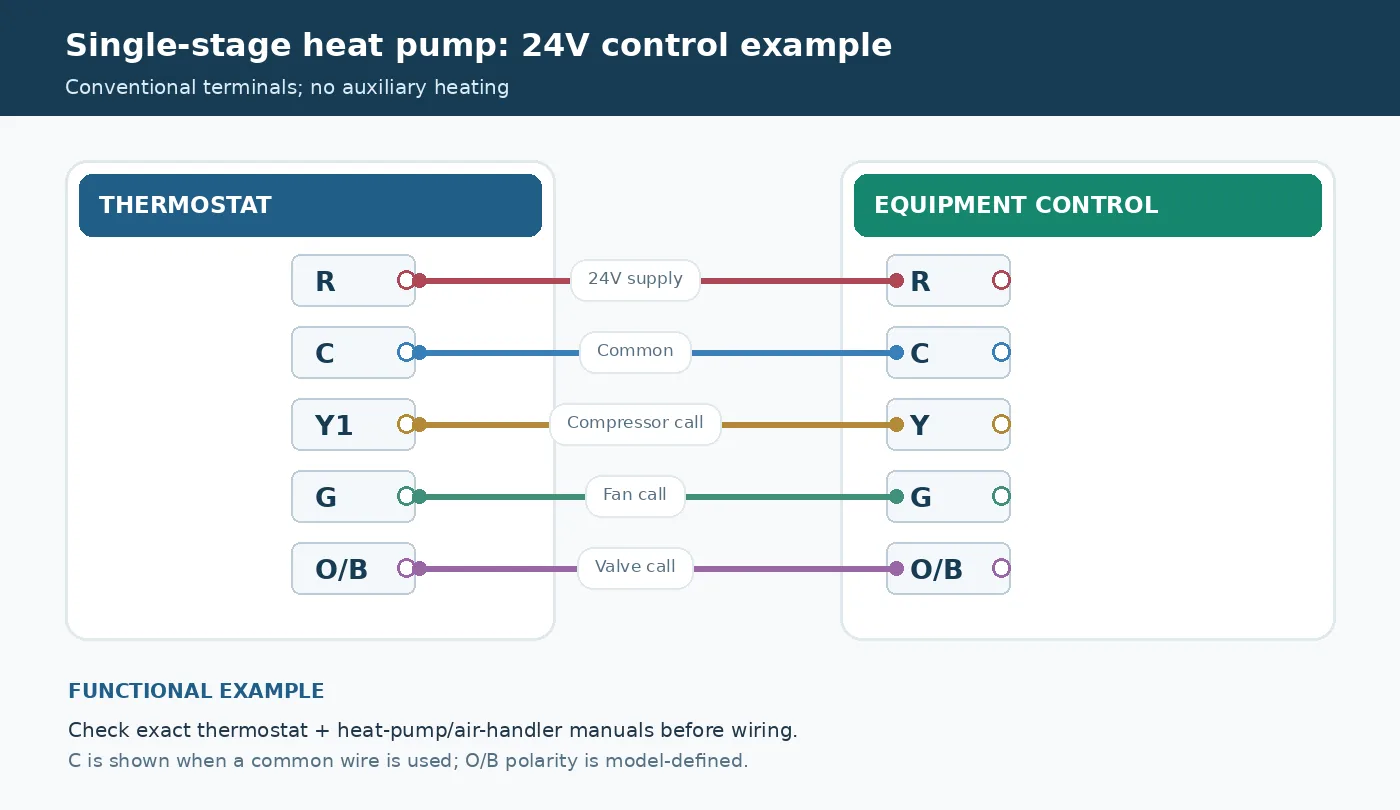
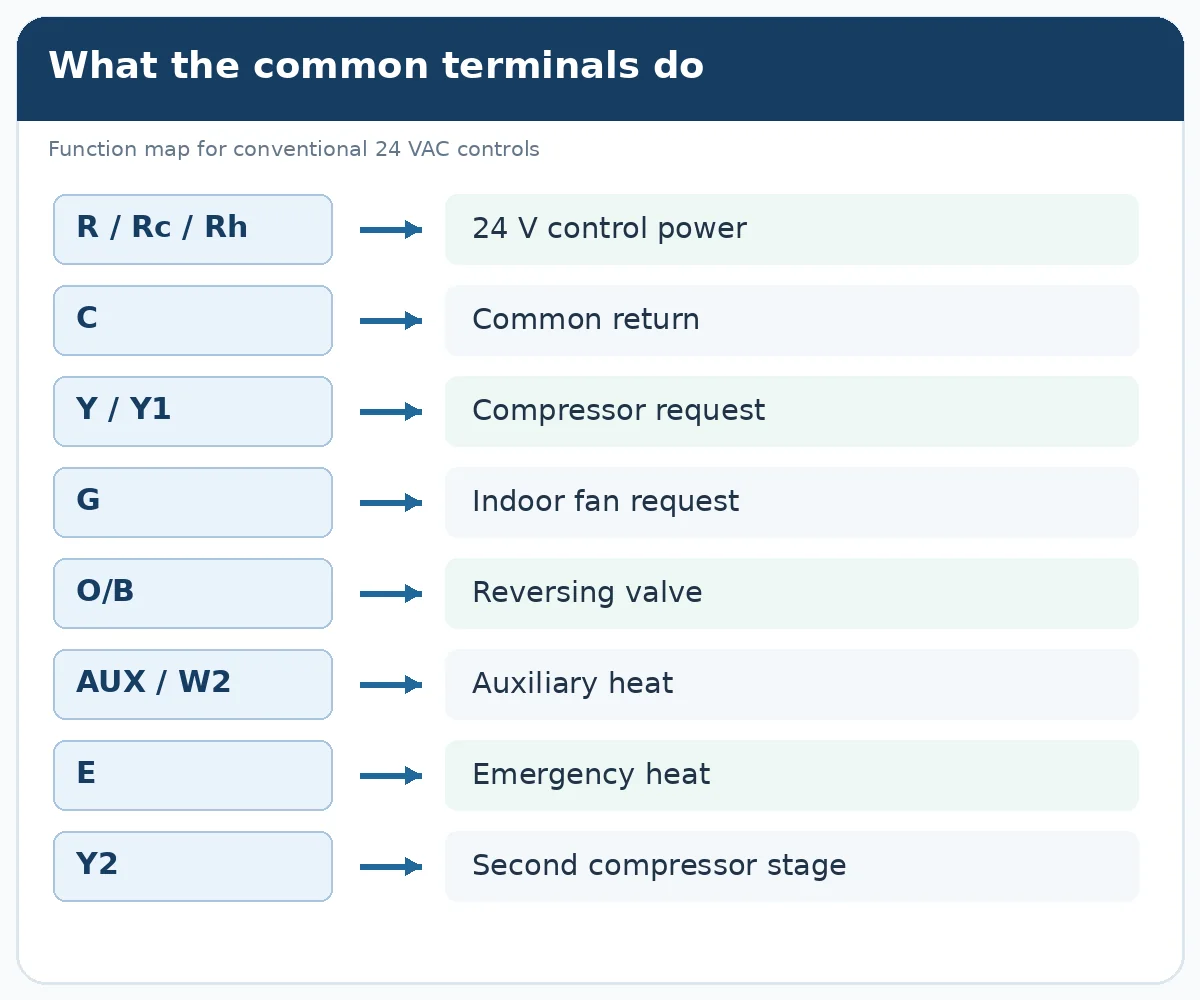
Use this function map for a conventional 24V single-stage heat pump with no auxiliary heater. R supplies control power, C is the common connection when needed, Y1 requests the compressor, G requests the indoor fan, and O/B controls the reversing valve. Match each function shown here to the terminal diagrams for your thermostat, indoor unit and outdoor unit before making connections.
| Thermostat function | Typical equipment function | What to verify |
|---|---|---|
| R | 24V control supply | Transformer arrangement and R/Rc setup |
| C | Common return | Actual connection to equipment C, if required |
| Y1 | Compressor request | Compatible first-stage input |
| G | Indoor fan request | Air-handler fan control |
| O/B | Reversing valve request | Whether the valve is energized in heat or cool |
Heat pump thermostat wiring with electric auxiliary heat
Electric resistance backup adds an auxiliary-heat request to the normal heat-pump controls. Find the heat-pump auxiliary output in your exact thermostat’s wiring table: Resideo T6 Pro examples may label it AUX, while certain ecobee heat-pump configurations use W1. The indoor equipment input may have a different label. Use the documented AUX/W1/W2 function and any separate emergency-heat input; add a jumper only if the approved model diagram explicitly requires one.
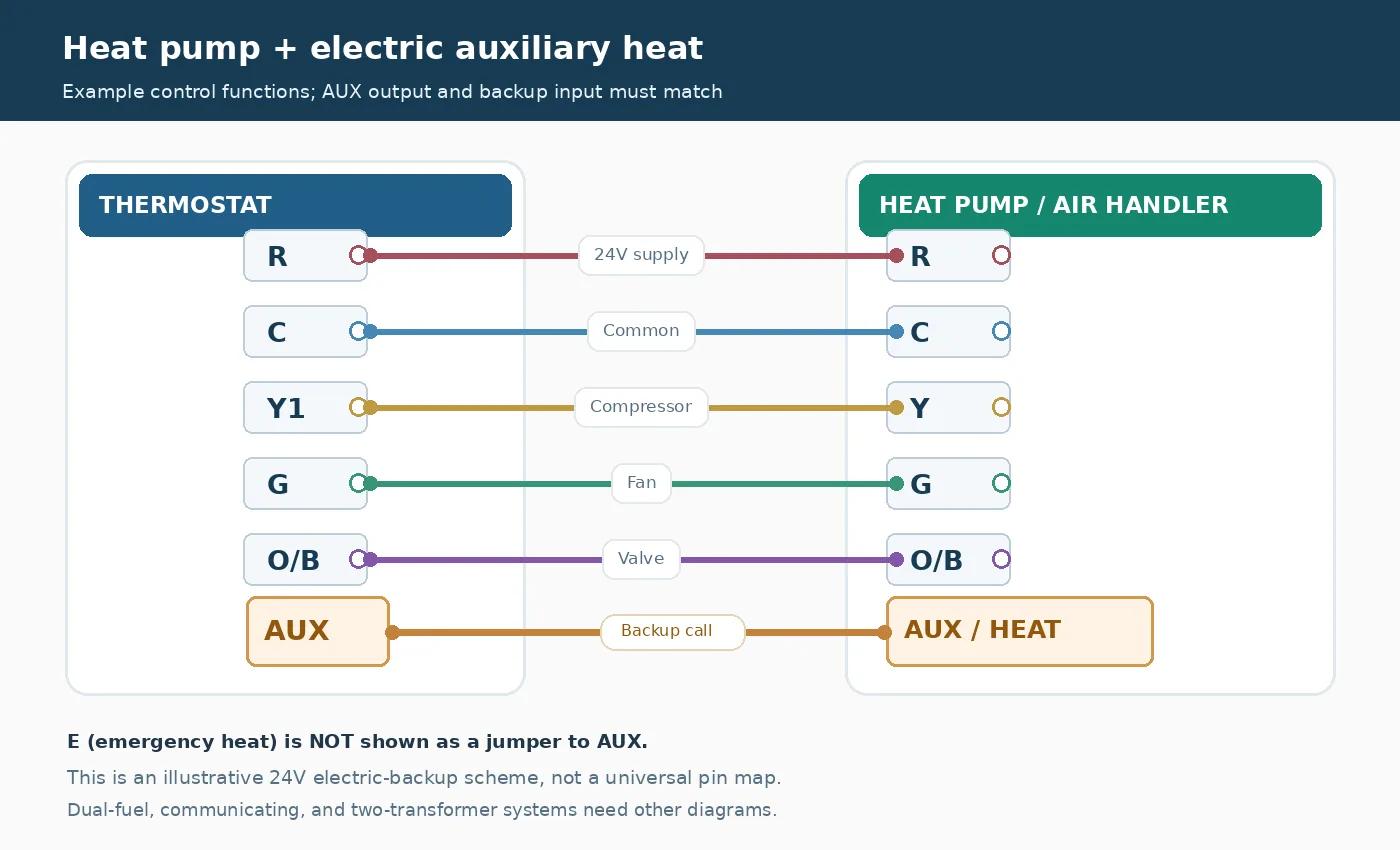
Check that the indoor equipment has electric auxiliary heat, that the thermostat supports its backup stages and that installer settings match the approved heater sequence. If the system instead uses gas backup, a communicating controller or two transformers, use that configuration’s dedicated section.
Which control systems need a different diagram?
These examples cover conventional 24V control. For communicating terminals, separate O and B conductors, an unknown B/C function, line voltage or an unclear Rc/Rh transformer arrangement, use the controller and adapter guidance below. Identify unfamiliar terminals before moving any wires.
What if the old thermostat has unfamiliar labels?
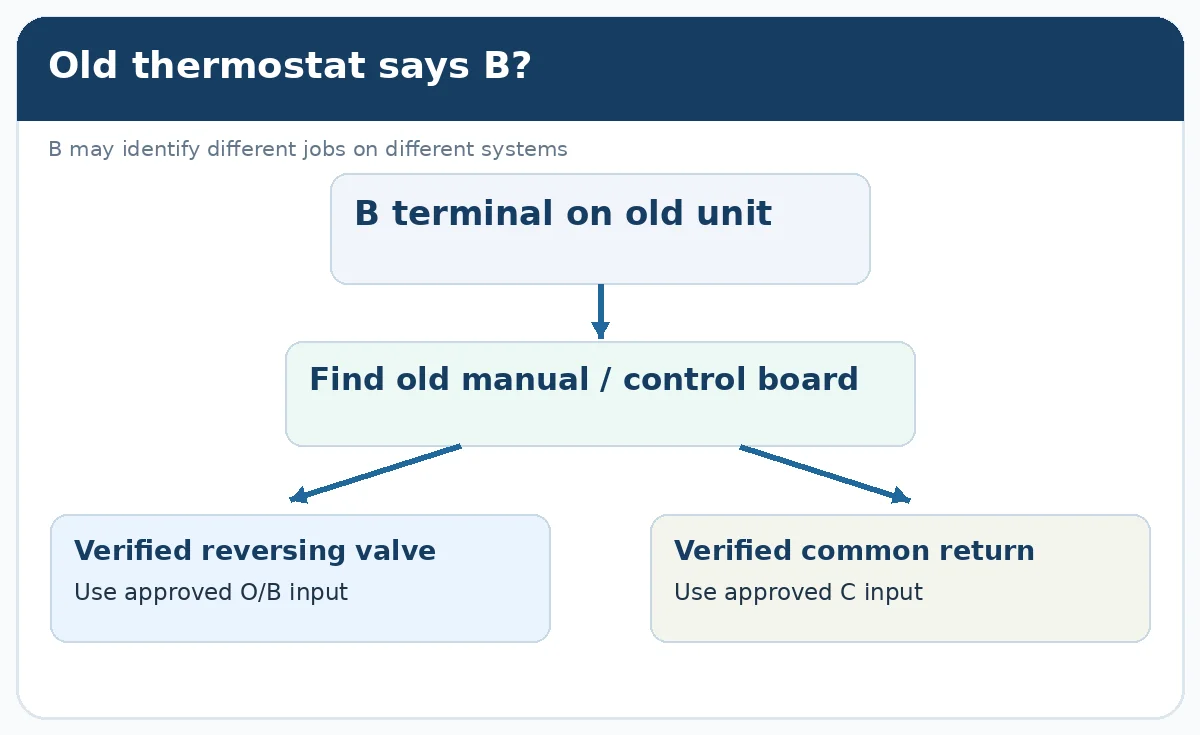
Make a list of the old terminal letters and the exact device models. Common exceptions include a B terminal that means common rather than reversing valve, a W terminal that means conventional heat rather than heat-pump backup, and Rc/Rh arrangements that depend on the number of transformers. Use the old controller instructions or board diagram to identify the real function before moving a conductor. If the old unit has separate O and B wires, stop using a simple one-to-one O/B diagram.
Heat pump thermostat terminals and wire colors explained
Terminals describe jobs; colors are only clues. Honeywell Home explicitly states that there is no standard wire color for each thermostat function. A red conductor may often carry R, but a wire becomes the R connection because the equipment and existing terminal identify it as R—not because it is red.
| Terminal | Normal function in a conventional heat pump | Color sometimes seen | Decision before connection |
|---|---|---|---|
| R / Rc / Rh | 24 VAC control power | Red | Confirm transformer arrangement and thermostat R/Rc setup |
| C | 24 VAC common return | Blue, black | Confirm continuous connection to equipment C |
| Y / Y1 | First-stage compressor call for heating and cooling | Yellow | Confirm matching compressor input and system type |
| G | Indoor blower/fan command | Green | Confirm whether air handler needs a separate G call |
| O/B | Reversing-valve command | Orange, blue, brown | Verify whether valve energizes in cooling or heating |
| AUX / W2 | Auxiliary heat request where supported | White, other | Confirm exact backup-heat output and terminal translation |
| E | Emergency-heat request if distinct and supported | Other | Confirm whether thermostat combines or separates E and AUX |
| Y2 | Second compressor stage when equipment supports it | Other | Verify both devices support two stages |
| L / A | Fault or equipment-status signal on some models | Other | Confirm support; do not use as an ordinary heat command |
One thermostat may combine AUX/E on a single terminal, while another may use W1 to control auxiliary heat when configured as a heat pump. Check the selected product’s heat-pump wiring instructions. This is why a simple “white to white” instruction can be wrong.
How 24V thermostat control requests work
A conventional thermostat normally sends low-voltage requests; it does not power the compressor motor directly. The indoor or outdoor equipment decides whether it can respond after its built-in delays and safety checks. This is why a thermostat display or fan can operate even when the compressor does not start.
| Thermostat mode | Typical control request | Expected equipment behavior |
|---|---|---|
| Cooling | Compressor request + cooling valve state | System provides cooling once equipment permits startup |
| Heat-pump heating | Compressor request + heating valve state | System provides heat through the compressor |
| Backup heat (if fitted) | Supported AUX/E request | Approved heater responds with the required compressor/fan sequence |
Why Y works in both heating and cooling
A reversible heat pump uses its compressor in both operating modes. Y/Y1 asks the compressor to run. O/B sets the refrigerant-flow direction through the reversing valve. Unlike a conventional gas furnace, ordinary heat-pump heating is not necessarily a W-only call. This difference matters when replacing a standard furnace thermostat with a heat-pump thermostat.
How to wire a conventional heat pump thermostat step by step
For a verified conventional 24V heat-pump system, follow these eight steps: record the old wiring, match each control function to the new thermostat, configure the installer settings and test every supported operating mode.
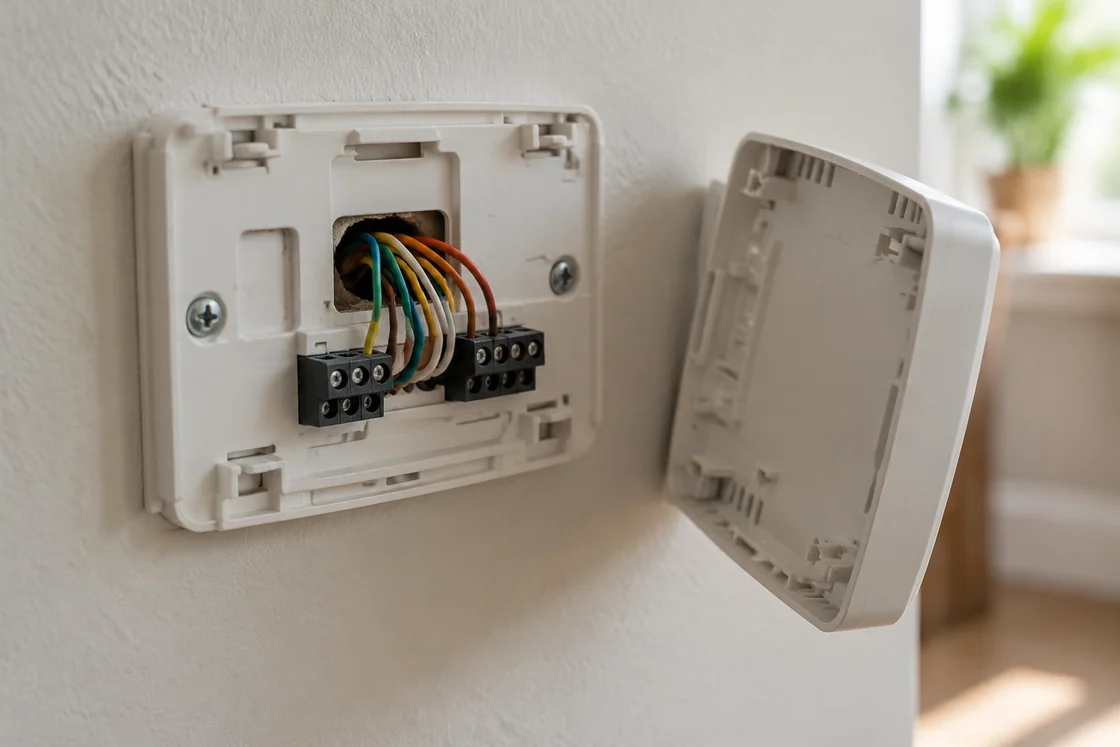
- Identify the equipment first. Record the thermostat model, air-handler/indoor-unit model, outdoor heat-pump model and any backup heat. Check that the proposed thermostat supports the number of compressor and backup-heat stages.
- Shut off the applicable HVAC power sources. Follow the equipment’s isolation instructions. A blank thermostat screen alone is not proof that every hazardous source is off. If safe isolation is uncertain, use a qualified technician.
- Photograph the old terminal arrangement. Include the terminal letters, each connected conductor and any small jumper. Keep the photo even after the new thermostat starts working.
- Label wires by the old terminal, not by color. Make a written list such as “yellow conductor previously on Y1.” Secure loose conductors so they do not touch each other.
- Verify unknown functions. Compare the old thermostat instructions with the equipment control schematic. Do not guess at B/C, AUX/E, Rc/Rh, O/B, or data terminals. A safe equipment-board inspection may require professional access.
- Install the replacement thermostat using its heat-pump table. Translate the verified function to the correct terminal on that exact model. Tighten or seat conductors as specified; do not put bare copper outside an approved terminal.
- Set the installer menu before normal operation. Choose heat pump; set O/B polarity, compressor stages, fan control and auxiliary/dual-fuel settings to match the equipment.
- Restore power and commission. Test fan, cooling, heating, auxiliary/emergency heating if installed, and second-stage operation if supported. Record any mismatch and correct the cause before handing over the system.
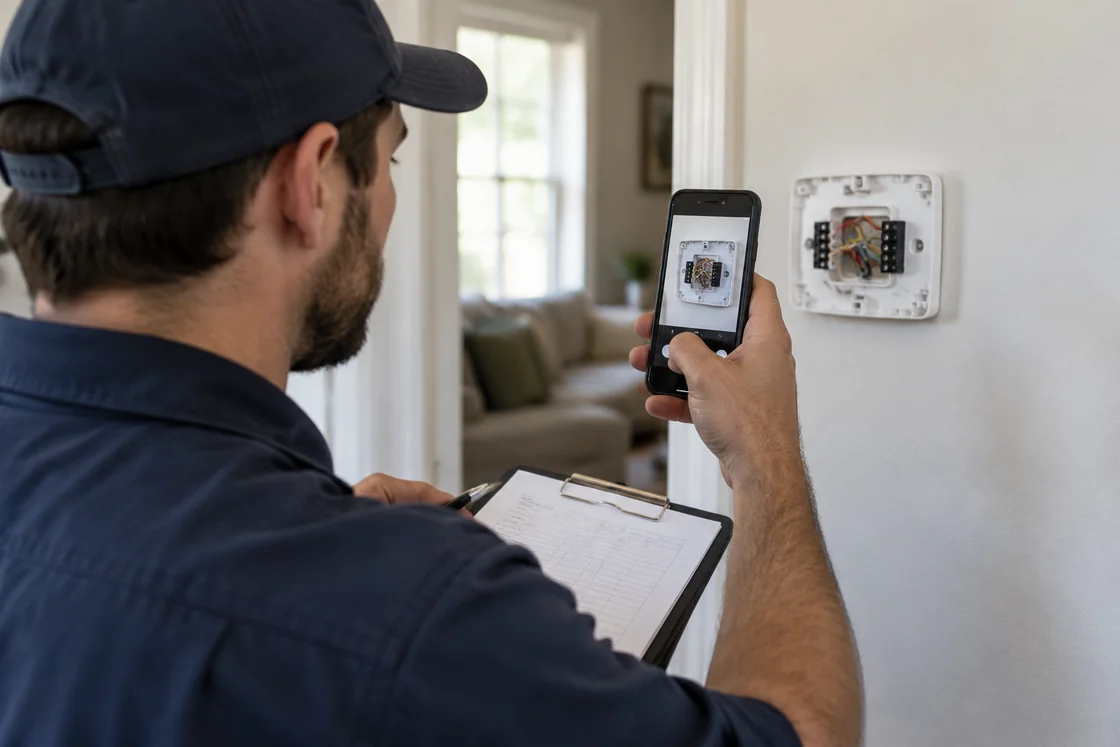
A useful installation record has five fields: old terminal → wire identifier → verified function → new terminal → test result. It makes later troubleshooting faster and prevents a second technician from relying on color alone.
Example transfer record (illustrative):
| Old terminal | Verified function | New thermostat input | Confirm after setup |
|---|---|---|---|
| R | 24V power | R or model-specified power input | Thermostat powers correctly |
| Y or Y1 | Compressor request | Compatible Y1 | Normal heat-pump and cooling tests |
| G | Indoor fan request | G if required | Fan behaves as programmed |
| O | Valve energized in cooling (example) | Compatible O/B | Heating and cooling not reversed |
| AUX | Electric backup request (only if verified) | Exact-model AUX/W1/W2 | Approved backup test |
| Unknown B | Not verified | Do not connect | Trace equipment-board function first |
O/B reversing-valve wiring: heating versus cooling
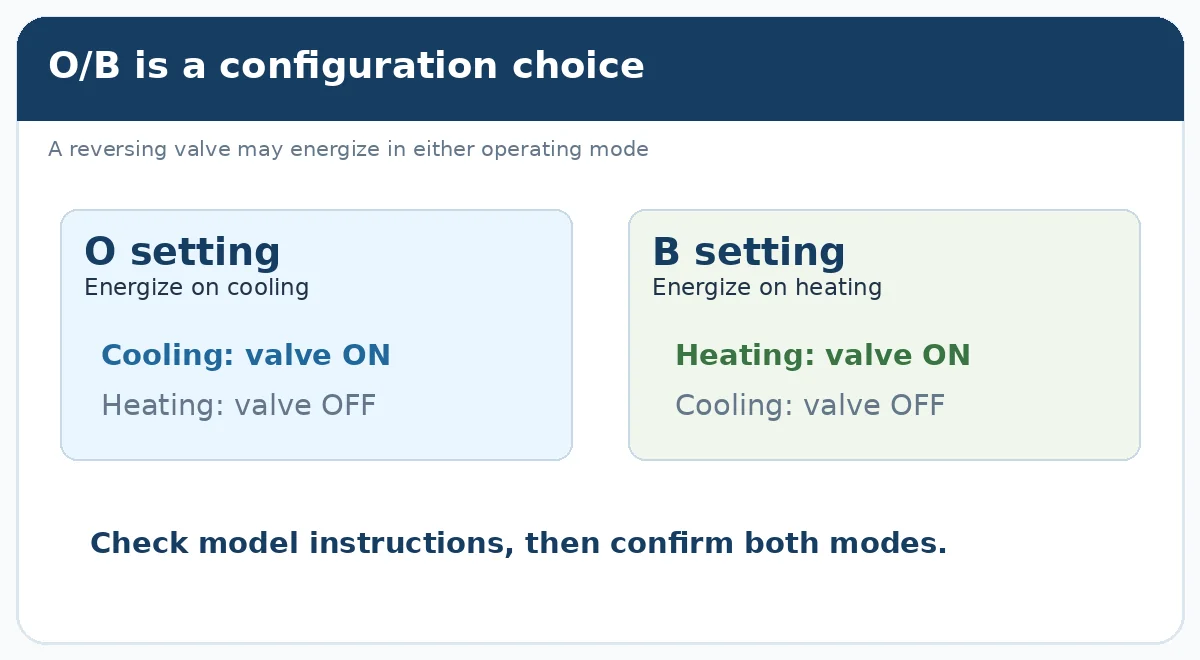
O/B is the signal that selects the reversing-valve position on many conventional heat pumps. The thermostat’s setting determines when that output is energized. One unit may energize the valve in cooling (often called O); another may energize it in heating (often called B). The correct choice comes from the equipment manual, not the wire color or brand stereotype.
| Verified heat-pump control | Thermostat setting | What to check in commissioning |
|---|---|---|
| Valve energizes during cooling | O / energize on cool | Cooling actually cools; heating actually heats |
| Valve energizes during heating | B / energize on heat | Heating actually heats; cooling actually cools |
| Valve behavior is unknown | Do not choose at random | Find the exact equipment instructions before testing |
If the unit heats when cooling is selected after a thermostat replacement, check that the installer menu identifies a heat pump and that O/B polarity matches the equipment. Google Nest provides model-specific steps for this setting. If both modes are still reversed after you apply the documented setting, a qualified technician should check the reversing-valve control circuit and equipment fault indications.
Is an old B wire always an O/B wire?
No. An older B label can also be a common wire on some thermostats. Connecting a real C/common conductor to a modern O/B terminal can damage controls. Google Nest advises checking the equipment board or original manual to distinguish those cases. If you cannot identify B, stop and have the function verified rather than experimenting.
AUX, W2 and E: connecting backup and emergency heat
Auxiliary heat and emergency heat are different operating requests, even when they use the same physical heater. Auxiliary heat can supplement the compressor during normal heating when the system permits it. Emergency heat is a special mode that may operate backup heat without the normal compressor call. The exact terminal and control sequence vary by thermostat and heater type.
| Control function | Purpose | Typical terminal label | What must be verified |
|---|---|---|---|
| Auxiliary heat | Adds heat when allowed by the control strategy | AUX, W2, sometimes W1 on a heat-pump setup | Backup-heat type, permitted simultaneous operation and heating stages |
| Emergency heat | Provides a backup-only operating mode where equipped | E, AUX/E, or model-specific W1 | Whether compressor is disabled and which heater is energized |
| Second auxiliary stage | Adds another approved backup stage | W2 or model-specific | Two-stage backup equipment and thermostat support |
Auxiliary-heat terminal labels differ by thermostat model. For example, ecobee guidance for certain heat-pump installations maps an old AUX/AUX1 or W2 wire to the new W1 auxiliary input. Some Resideo/Honeywell heat-pump models use a dedicated AUX terminal rather than the conventional-heat W input. Follow the exact model’s heat-pump terminal assignment, including whether emergency heat uses a separate output. Connect or bridge AUX and E only when that model’s approved diagram explicitly calls for it.
| Heating arrangement | What AUX/E means | Check before enabling |
|---|---|---|
| Heat pump + electric strip backup | May add heat while compressor runs if control design permits | Approved strip stage, fan behavior and any lockouts |
| Emergency heat mode | May use backup heater without normal compressor operation | Exact emergency-mode output and compressor lockout |
| Heat pump + gas furnace | Fuel-fired heat requires a dual-fuel changeover sequence | Who has control authority; whether outputs must be mutually exclusive |
Should auxiliary heat run with the compressor?
Electric resistance auxiliary heat can run alongside the heat pump when the approved control sequence permits it. With gas-furnace backup, the dual-fuel controller normally decides when to stop the heat-pump compressor and start the furnace. Confirm the indoor coil and heater arrangement, fan operation, temperature lockouts and equipment control settings before allowing either sequence.
Two-stage heat pump thermostat wiring: what Y2 changes
Y2 requests a second compressor stage only when the heat pump has a compatible second-stage input. A thermostat with Y2 cannot make a single-stage compressor operate at a second capacity. If both thermostat and equipment support a conventional two-stage interface, use the manufacturer’s Y1/Y2 arrangement and corresponding installer settings.
| Equipment | Appropriate approach |
|---|---|
| Single-stage heat pump | Use Y/Y1 as documented; do not invent Y2 |
| Conventional two-stage compressor | Verify Y1 and Y2 paths at thermostat and equipment; enable two stages in settings |
| Variable-capacity inverter or communicating system | Use supported interface; a standalone Y2 wire may not provide the intended variable control |
A conventional two-stage compressor needs a thermostat and equipment interface that both accept Y1 and Y2. A variable-speed inverter system may instead change compressor speed through its own controller while receiving only a basic thermostat request—or through a proprietary communication interface. A spare conductor on Y2 does not prove that a second stage is available.
Stage numbers also affect equipment compatibility: confirm whether the thermostat can handle both the requested compressor stages and the actual number of auxiliary-heat stages. Google Nest’s compatibility guidance differs by Nest model and generation, so “Nest supports heat pumps” is not enough to confirm a particular wiring job.
Honeywell, Nest and ecobee heat pump thermostat wiring differences
Choose a thermostat by its supported heat-pump controls and model-specific diagram, not by brand name alone. The same terminal letters can sit in different places, and the meaning of a multipurpose terminal may change with installer setup.
| Thermostat family | Important difference | Best installation reference |
|---|---|---|
| Honeywell Home / Resideo | Heat-pump AUX/E and conventional W wiring may differ; some models use an R slider | Honeywell Home terminal guide and exact model’s heat-pump wiring diagram |
| Google Nest | Setup generates a wiring diagram after identifying equipment and wires; B may mean O/B or C on older systems | Nest wire identification and Nest compatibility |
| ecobee | Some models use W1 for heat-pump auxiliary heat and support an approved power extender when needed | ecobee installation resources and exact model documents |
| Confirm before selecting a model | Why this changes the wiring or setup |
|---|---|
| Exact thermostat model and generation | Terminal assignments, stage limits and installer menus can differ within a brand |
| Thermostat photo plus air-handler/outdoor model | A color or old terminal letter alone does not identify the control function |
| Compressor stages and AUX heat stages | Checks for Y2 and backup-stage compatibility |
| Old B, Rc/Rh and available C conductor | Determines valve/common identity, transformer layout and power accessory needs |
| Heat pump vs communicating interface | Determines whether a standard 24V thermostat is supported |
For example, the ecobee Smart Thermostat Enhanced installation manual describes supported configurations with up to two compressor stages and one auxiliary-heat stage. It also covers O/B polarity and the setting for simultaneous auxiliary heat. See the Enhanced setup manual for this model; for another ecobee, use its own guide to check compressor stages, backup-heat inputs and O/B settings.
C wire, Rc/Rh and power problems
C completes the low-voltage power circuit used by many smart thermostats. The display may work on a battery-powered old thermostat without a C conductor connected at the wall. A replacement smart thermostat may need C or a manufacturer-approved power accessory. Determine whether an unused conductor can actually be connected to the documented equipment C terminal; never assign C from its blue color alone.
Rc and Rh require separate care. Some systems have one transformer and use an internal R/Rc connection. Others have two separate transformers and need an approved two-transformer configuration. A jumper shown in one model’s drawing must not be copied blindly to another model. A wrong connection can short control power or damage a board.
If a screen is blank after installation, check the known power path, terminal seating, equipment disconnects, air-handler door switch and appropriate equipment protection devices. If a fuse blows again or voltage is unstable, stop changing wires and arrange diagnosis of the underlying fault.
Dual-fuel heat pump thermostat wiring with a gas furnace
A dual-fuel setup needs a defined switch between heat-pump heating and fuel-fired backup, not just a spare W wire. Find out which controller has authority over the compressor, furnace call, fan and lockout. The desired behavior can change with outdoor temperature and equipment requirements.
| Control question | What the approved design must establish | Acceptance observation |
|---|---|---|
| Who changes from heat pump to furnace? | Thermostat or external dual-fuel controller has authority | Correct heat source responds at the selected changeover |
| What happens to the compressor? | Approved compressor lockout/changeover sequence | No conflicting compressor and furnace calls |
| Who controls the blower? | Furnace/air-handler fan sequence remains correct | Air movement follows equipment instructions |
| Which setting decides changeover? | Outdoor sensor, lockout or balance-point logic as documented | Heating tests match the configured condition |
Before approving the thermostat, answer these questions:
- Does the selected thermostat or external interface explicitly support heat pump plus gas furnace?
- Which device stops the compressor when gas heat is requested? Which command starts the furnace?
- Does the design forbid simultaneous compressor and furnace heating, or is an exception documented?
- Is a dual-fuel balance point or lockout temperature set by the control manufacturer and equipment design rather than guessed from climate alone?
- Are the required safety, fan and defrost sequences still maintained by the chosen controller?
Do not copy an electric-strip AUX/E jumper arrangement into a gas-furnace installation. The Resideo T6 Pro wiring family includes dedicated dual-fuel diagrams precisely because its wiring and configuration are not identical to electric auxiliary heat.
Which systems need a different thermostat controller or adapter?
Communicating or line-voltage systems need the controller or approved interface specified for their equipment. Many ductless mini-splits, VRF systems and proprietary inverter units communicate through dedicated terminals instead of conventional R/C/Y/G calls. Air-to-water heat pumps may also coordinate pumps, valves and water-temperature sensors through their built-in controller. Look up the supported thermostat interface or adapter before choosing a replacement.
Many ductless mini-splits use a dedicated indoor–outdoor communication link. Our mini split heat pump installation guide explains the electrical and communication checks used for these systems, along with the wider installation process.
For air-to-water systems, look beyond the wall thermostat to the water circuit, circulation pumps, storage tanks and controller inputs. Our air-to-water heat pump diagram guide shows how to read those piping and control relationships. Use the selected model’s control documentation for actual terminal assignments.
Use the equipment-specific diagram or arrange professional diagnosis if you find:
- A/B/C/D or other data/communication terminals without documented R/C/Y/G functions.
- A line-voltage thermostat, unidentified voltage or an exposed mains wiring task.
- Two separate transformers with an unclear Rc/Rh plan, or separate O and B conductors whose roles are unknown.
- Controls for a boiler, motorized zone valve, water loop or building management system that rely on a different switching method.
- A low-voltage fuse that repeatedly opens or wiring that appears modified or damaged.
For the broader electrical and piping context, see our heat pump schematic diagram guide. Use the actual model diagram before approving the control interface.
Heat pump thermostat troubleshooting by symptom
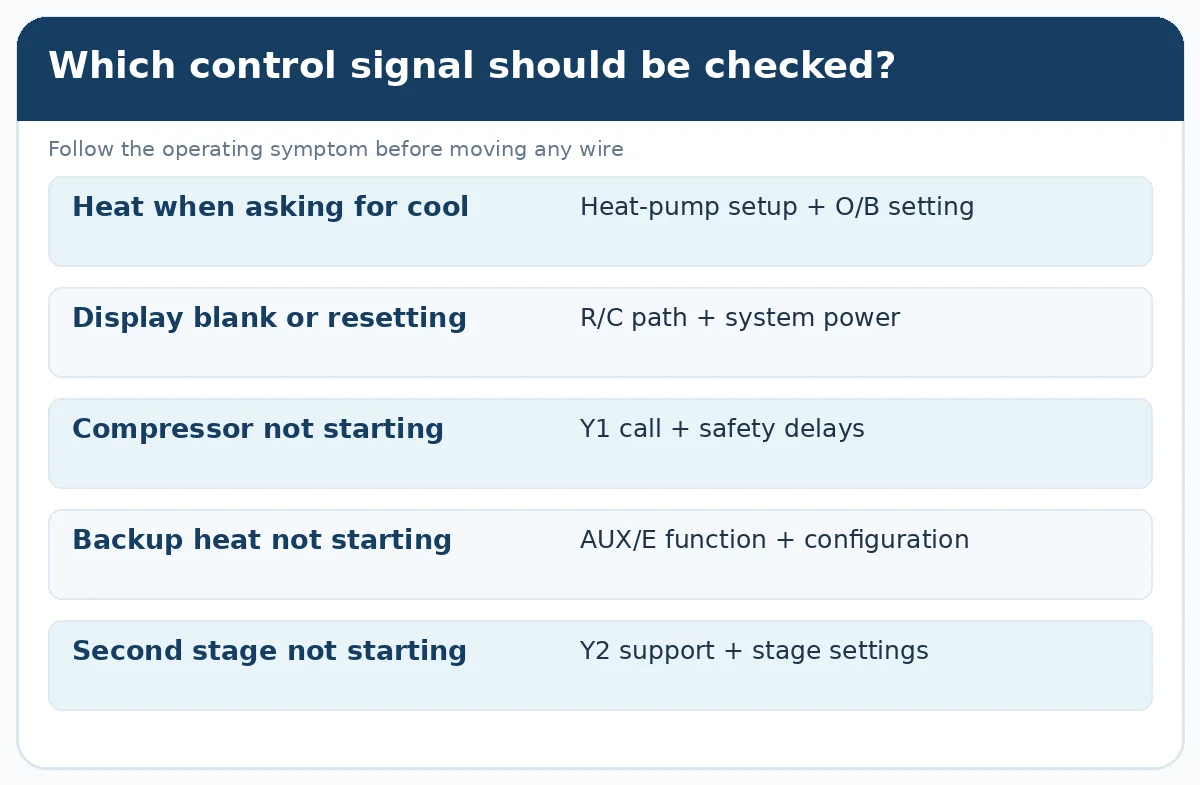
Begin with the observed symptom and confirm the thermostat command before changing wiring. A wrong setup can look like a refrigerant or compressor fault, and an equipment fault can look like a thermostat problem.
| Observed symptom | First check | Next action after verification | Confirm corrected |
|---|---|---|---|
| Cool mode produces heat | Heat pump equipment type and O/B setting | Correct a verified setting mismatch; otherwise investigate valve-control wiring | Test both Heat and Cool modes |
| Display works; compressor off | Y/Y1 request, stage settings and equipment protection delay | Follow control/equipment diagnostic path rather than bypassing a safety | Compressor starts when the equipment permits it |
| Only AUX/E makes heat | Normal Y1 request, backup mode and lockout | Restore approved heat-pump control or repair equipment fault | Normal heat-pump heating works without relying on emergency heat |
| Screen blank or restarts | R/C path, approved adapter and indoor access-panel switch | Correct a verified supply or short; stop if protection repeatedly trips | Stable display and supported fan/heat calls |
| Indoor fan runs; no cooling | Y1 request, outdoor status and safety controls | Trace the compressor request at appropriate service points | Cooling output returns when equipment is ready |
| Second stage does not work | Y2 equipment support and thermostat staging | Correct model-approved stage wiring/setup, not add speculative Y2 | Approved stage-two test or recorded transition |
| AUX never responds | Actual AUX/W1/W2/E mapping and heating configuration | Correct documented setting or backup-heater problem | Backup-only or assist test matches the system design |
When a qualified technician must test energized signals, they should follow the manufacturer’s procedure and appropriate electrical safety practice. Do not keep replacing fuses or shorting terminals to see what starts.
How to confirm correct thermostat operation after wiring
A powered-up screen is only the first check; commissioning proves that the thermostat requests the intended equipment response. A quick, repeatable handover check also creates useful evidence for future service.
- Thermostat and fan: verify normal screen operation and a supported fan request. Check that fan behavior agrees with the air handler’s programmed sequence.
- Cooling: request cooling, allow for any compressor protection delay, then verify the system actually cools and the reversing valve is in the intended state.
- Heating: request heat, allow the normal operating sequence, and confirm that heat-pump heating—not just emergency backup—works.
- Auxiliary or emergency heat: use the equipment’s supported test method. Confirm which heat source runs, whether the compressor should be locked out and that the fan operates as designed.
- Second stage: if the installation supports Y2, test or observe the allowed stage transition using the model’s approved commissioning method.
- Record results: note the thermostat model, installer configuration, wiring photo and observed outcomes. If a mode fails, fix and repeat that test before use.
| Test request | Expected response | Record for handover |
|---|---|---|
| Fan (if separately supported) | Air handler runs as the selected fan mode requires | Pass / observed behavior / follow-up |
| Cooling | Equipment cools after its normal startup delay | Pass / observed cooling / follow-up |
| Heat-pump heating | Compressor-based heating works in ordinary Heat mode | Pass / observed heating / follow-up |
| Electric AUX / emergency (if present) | Correct backup heater and compressor behavior | Pass / backup source / follow-up |
| Y2 (only on supported models) | Approved stage transition occurs | Pass / observed stage / follow-up |
Thermostat testing is one part of full system commissioning. Our air source heat pump installation guide covers the wider electrical, control, heating-system and handover checks for a complete installation.
If a confirmed thermostat call does not produce the expected equipment response, record the requested mode, observed state and any fault indication. A qualified technician can then follow the unit’s service sequence for protection limits, sensors and control-board faults; live electrical measurements require the proper equipment and safety procedure.
Choosing a heat pump and thermostat control interface for a project
For a new build or equipment replacement, agree on the control interface before selecting the thermostat. Some systems accept conventional dry low-voltage commands; others need a dedicated controller or building-management connection. This choice affects stage control, backup heating, freeze protection and commissioning.
For distributors and OEM projects with specified controls or connectivity requirements, see our OEM/ODM heat pump control options. Share the target product, controller type, control signals and any required communication protocol so the proposed configuration can be reviewed.
For air-to-water project planning, the following models illustrate control-interface features described on their product pages. These examples are product-selection references, not evidence of universal 24V thermostat compatibility.
| Airproz product | Control features described on the product page | When to compare it |
|---|---|---|
| R290 monobloc heat pump 6/8/12kW | Dual-zone control, Wi-Fi and a reserved RS485 interface for supported integration | Smaller air-to-water projects considering room zones or supervisory controls |
| R290 monobloc heat pump 18kW | Touchscreen control, Wi-Fi and RS485/BMS-related features | Larger air-to-water projects evaluating central monitoring or BMS interfaces |
Before selecting a third-party thermostat or BMS, confirm the exact controller version, available terminals, supported protocol and integration method for the chosen model.
Planning a heat-pump project? Send Airproz the equipment models, destination market, thermostat or controller model, required control interface, compressor stages, backup-heating arrangement and project quantity. We can review documented control options for the selected product configuration and identify the compatibility points that still need a model-specific check. Explore our space-heating heat pump range or contact Airproz with your project details.
Conclusion: the right way to wire a heat pump thermostat
The right approach to heat pump thermostat wiring is to identify the control interface, match verified terminal functions, configure the supported heating and cooling stages, and test how the system responds. In a conventional 24V heat pump, R, C, Y/Y1, G and O/B cover the common control functions; AUX, E and Y2 are used where the installed equipment and controller support them. Identify any unknown voltage, B/C terminal or transformer arrangement from the actual equipment diagram before work continues.
Heat pump thermostat wiring FAQ
Can I connect thermostat wires by color alone?
No. Thermostat wire colors are not standardized. Use the old terminal label, equipment control-board designation and exact thermostat manual to confirm every function.
Does every heat pump thermostat need a C wire?
No. Some thermostats operate without a connected C wire, while many smart models need C or an approved power accessory. Check the exact thermostat and whether a spare conductor reaches equipment C.
Is the B terminal a reversing-valve or common wire?
It can be either on different older systems. Identify the B terminal at the original thermostat and equipment board. Never move an unknown B conductor straight to O/B or C.
Where does the white wire connect on a heat pump thermostat?
The white wire’s connection depends on its original terminal function. Check whether it previously served AUX, W2, E, W or another input, then match that verified function in the replacement thermostat’s heat-pump wiring table.
Are AUX, W2 and emergency heat E interchangeable?
Not automatically. AUX/W2 commonly requests supplemental heat, while E may request a separate emergency-heat mode. The thermostat may combine or separate them; use its specific backup-heat diagram.
Why does my heat pump cool when the thermostat calls for heat?
After a thermostat replacement, first verify the heat-pump equipment setting and O/B reversing-valve configuration. Then retest both heating and cooling. If the setting matches the manual, investigate the equipment response.
Can I install a Nest, Honeywell or ecobee thermostat on any heat pump?
No. Compare the exact model’s voltage, compressor stages, auxiliary heat, transformer arrangement and communication interface. Use the official model-specific compatibility checker or installation guide.
Does adding a Y2 wire make my heat pump two-stage?
No. Y2 can request a second stage only if the heat pump has a compatible second-stage input and the thermostat has been correctly configured for it.
Can a standard thermostat replace a communicating mini-split controller?
Usually not directly. Communicating and proprietary systems need an approved interface or controller. Check whether the heat-pump manufacturer supports an adapter for the exact model.
Can I use a five-wire thermostat diagram if my heat pump has auxiliary heat?
Not as a complete guide. A system with auxiliary heat needs an approved backup-heat control output in addition to the ordinary heat-pump calls. Identify the heater type, exact thermostat terminals and installer settings before following an electric-AUX diagram.
What must I check before replacing a thermostat in a dual-fuel system?
Confirm whether the thermostat or an external controller manages changeover, how it stops the compressor during gas heat, the supported Rc/Rh arrangement, and the equipment-approved fan and lockout sequence. Do not reuse a generic electric-AUX wiring example.
Technical references
- Honeywell Home thermostat wiring and terminal functions
- Google Nest: identify thermostat wires and B/C exceptions
- Google Nest: heating and cooling reversed
- Google Nest thermostat compatibility
- ecobee heat-pump installation guidance
- ecobee Smart Thermostat Enhanced manual
- Honeywell Home: terminal functions and wire-color limitations
- ecobee: old AUX/W2 and new W1 terminal guidance